AI adoption in a small team
What we tried at a small startup, what actually got used, and what turned out to be redundant
Where this started
It’s always interesting to see how other companies adopt AI and which use cases they find for it, but there aren’t many articles on that (at least that’s how it feels). So today I’ll tell you what we tried at SQUAKE and how it went.
This wasn’t our first contact with AI. The dev team had been using Claude, Codex, Gemini, Pi, and Opencode for a while. But I noticed that our non-technical peers barely touched any of it, or used it on a very basic level. So I decided to build something the entire company could use.
We built it in January - February of 2026, and this article describes that version. I’d do some parts differently now - we’ve learned a lot and more tools exist - and I’ll point out where.
I find it funny that as soon as major players started claiming they 100x’d their productivity with AI, our CPO approached me and asked to do the same. I don’t believe those claims, but I did think we could use AI to speed things up. You have to start somewhere, right?
Here’s the thing though: whenever I interviewed sales, marketing, or product folks about a use case or automation that would simplify their life, I never got a clear answer. Not because they’re not smart - they just didn’t know what an agent could do, so they couldn’t imagine what to ask for. I eventually concluded that interviewing people about tools they’ve never used is pointless. You have to build the thing, hand it to them, and aggressively push them to use it. Reality does the requirements gathering for you.
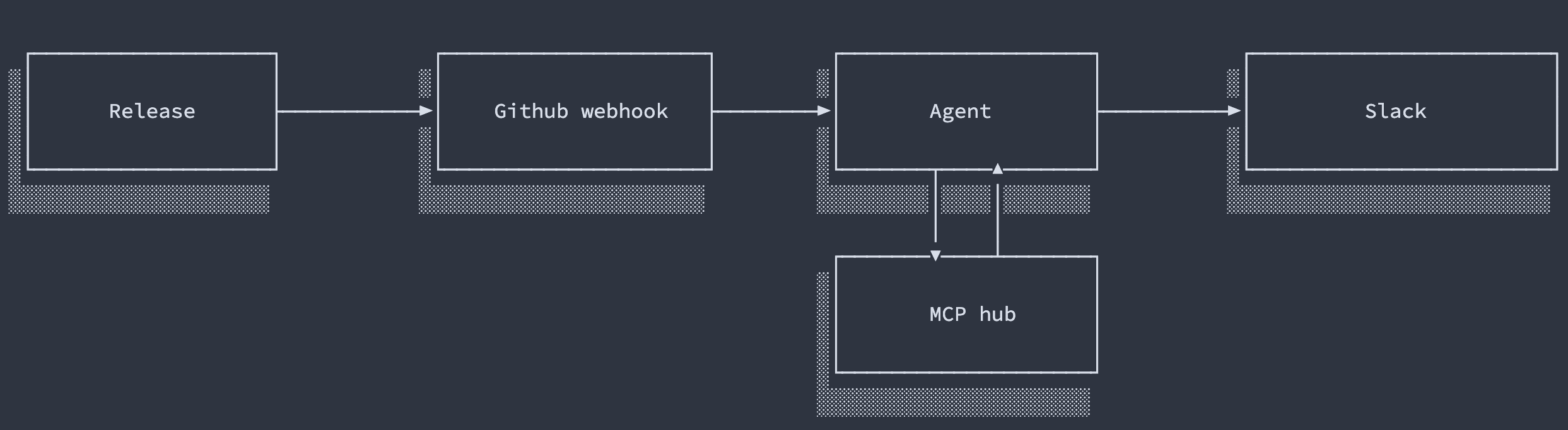
So I started with the one use case I could see myself: posting release notes into Slack as soon as I do a release.
The tool selection
Initially I picked Goose for the agent layer and FastMCP for the MCP hub, and turned it into a prototype pretty quickly. The architecture was simple.
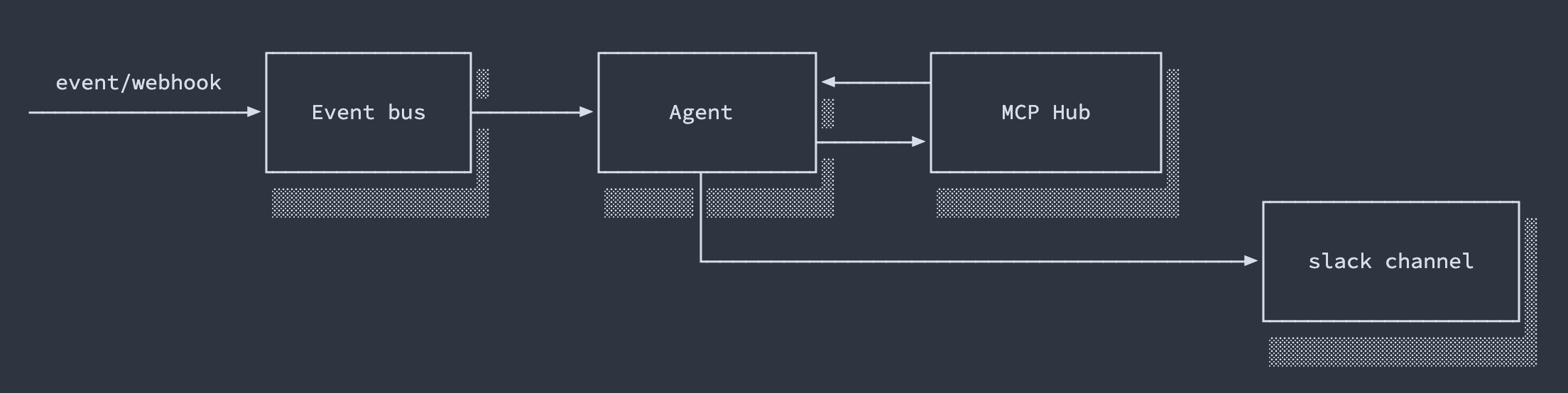
The first hurdle was the Bedrock provider. Since everything was deployed into AWS, I wanted to keep it all inside our VPC, hence Bedrock. Goose had a bug that broke structured output parsing from Bedrock, and that’s when I realized I needed something more flexible - something where I control the flow and can extend it. So I swapped the minimal Goose setup for a fully custom agent built with Pi.
As soon as I did that, I figured I didn’t need the fancy event bus either, and everything could live on a single machine. Yeah, I know - but what if I want to scale? Then we’d have to make sure we don’t process events twice. I decided we won’t have to scale for a while, so why overengineer it from the get-go.
Shortly after, I configured a GitHub webhook and the agent actually posted release notes to the channel. But I was just getting started on use cases.
177 tools in a single manifest
For the release-notes use case I didn’t need any MCPs connected, but I decided to add some anyway. I first wanted to try the Slack MCP, then realized it was simpler to let the agent communicate through built-in Slack tools defined directly on the agent itself.
We use a lot of tools internally, so I figured I’d add whatever I could:
- aws (fine-grained read access)
- slack
- shortcut (tickets, sprints)
- sentry
- circleci (read only)
- prometheus (read only)
- gong (call recordings)
- cloudflare (read only)
- postgres (read only)
That added up to 177 tool definitions in a single manifest. As soon as I started testing, I noticed the context window sat at 70 - 80k tokens after my first prompt. We were loading the entire tool list into context whether the agent needed it or not. Every tool I added to make the agent more capable made it dumber.
The fix was code mode: instead of exposing 177 tools, expose three, and let the agent find and call the rest through code.
In the February version, the agent got discovery tools - list available MCPs, get the tool catalog, get recommendations for a task - and could pull schemas on demand instead of holding all of them in context. The version running today has converged to an even simpler trio: search to find tools by query, get_schema to load definitions for just the tools it’s about to use, and execute - a Python sandbox where the agent writes code that chains call_tool(...) invocations and returns only the final result.
That last one is the part that matters most, and the part I underestimated at first. Discovery saves context on the way in, but execute saves it on the way out: intermediate results from a five-step chain never touch the context window at all. The agent fetches a Sentry issue, cross-references Shortcut, and posts to Slack, and the model only ever sees the summary it wrote for itself.
Context stayed small. Capability didn’t shrink.
The Slack agent was mostly unnecessary
Time for the uncomfortable part.
The ambitious piece of this project was the always-on Slack agent - the custom runtime, the webhooks, the ECS deployment. And for most day-to-day use, it turned out to be redundant. Having the MCP server connected to Claude directly is reasonable and enough: you open Claude, it has access to Shortcut, Sentry, Postgres, and the rest, and you ask it things. That covers the majority of what anyone actually wanted to do.
Where the Slack agent did earn its keep is the event-driven work - the things no one is sitting in a chat window to ask for. It posts release notes when a release completes. It can aggregate feedback from business folks in a channel and turn it into Shortcut stories. That’s genuinely useful, and it’s the part I’d keep if I rebuilt this from scratch. But I built an agent platform and what I needed was a webhook handler with taste.
I also experimented with spinning up an ECS task running Opencode so the main agent could delegate development tasks to it. It worked, and it’s fine for tiny fixes, but it fits the same pattern: technically satisfying, rarely reached for.
So did anyone adopt it?
We still use it, but mostly inside Claude or Codex - the MCP is by far the most useful part. From time to time I use the Slack agent to turn messages from the support channel into tickets, and the release notes still post themselves.
The interesting part is how the rest of the company uses it. Nobody came back with the automation ideas I originally interviewed them for. Instead they ask it questions - how we do database backups, which algorithm we use to encrypt data - things that used to be a ping to the dev channel. The agent didn’t become everyone’s assistant; it became the thing that absorbs interruptions. Devs get more focused time to build, which, honestly, might be worth more than the automations I was trying to collect.
What I’d tell you if you’re starting this
Don’t interview your peers about use cases. They can’t see what’s possible, and you’ll get nothing. Ship one narrow thing that’s useful without anyone’s cooperation - our release notes - and push the tool on people until reality tells you what they need.
Don’t load every tool you have. Context is the budget everything else spends from. Search plus on-demand schemas plus code execution kept 177 tools reachable at a fraction of the cost.
And be suspicious of the ambitious component. The always-on agent was the most fun to build and the least necessary to have. The boring version - an MCP server plugged into Claude, plus a webhook handler for events - delivers most of the value at a fraction of the surface.
Still on the roadmap, for when there’s time: Salesforce MCP, sandboxed agents with browser use (powered by Cloudflare), and a memory cluster with actor-based cells (e.g. if Ben is reaching out, be direct and concise).